Want to grow your Instagram profile? Get more Instagram followers & likes!
Have you just watched a Reels video on Instagram and heard the song you like? Did you know that you can save it to your phone fast and easy?
In this article you are going to learn how to save a song from an Instagram Reels video.
Let’s get started!
How to save a song from an Instagram Reels video?
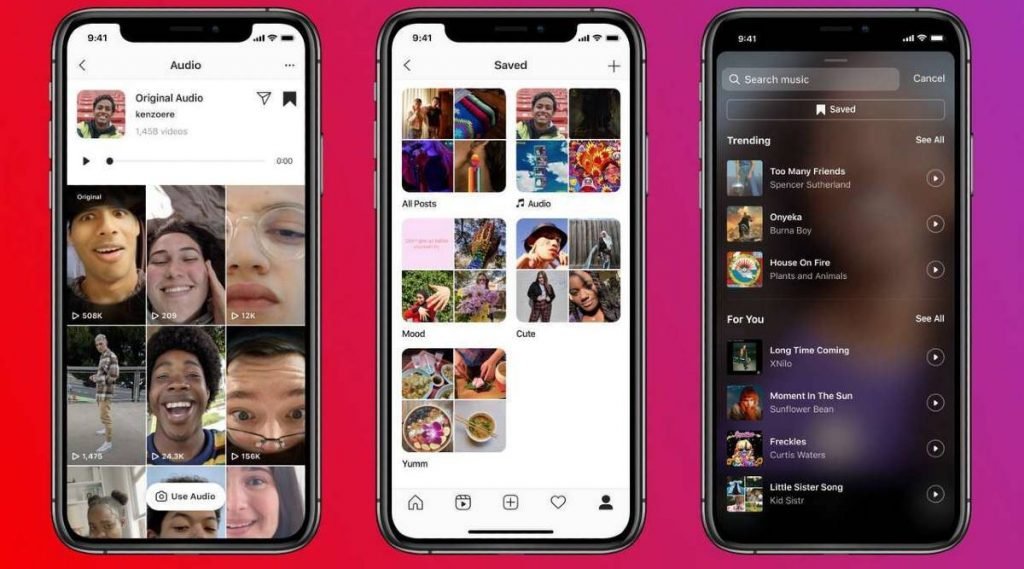
Follow these steps and you will learn how to save a song from Reels video:
- Log in to your Instagram profile if you haven’t already done that and click on the Reels tab.
- Now click on the audio title at the bottom of the Reel under the username.
- Once you do it, you will be moved to a page where you can see all Reels that were created using this particular audio.
- In order to save the audio and use it later, hit the bookmark icon in the upper-right corner of the screen.
That’s it for this article!
Want to grow your Instagram profile? Get more Instagram followers & likes!
I hope this guide was useful for you and you were able to save a song from an Instagram Reels video.
